Which Spec-Driven Development Tool Should You Choose?
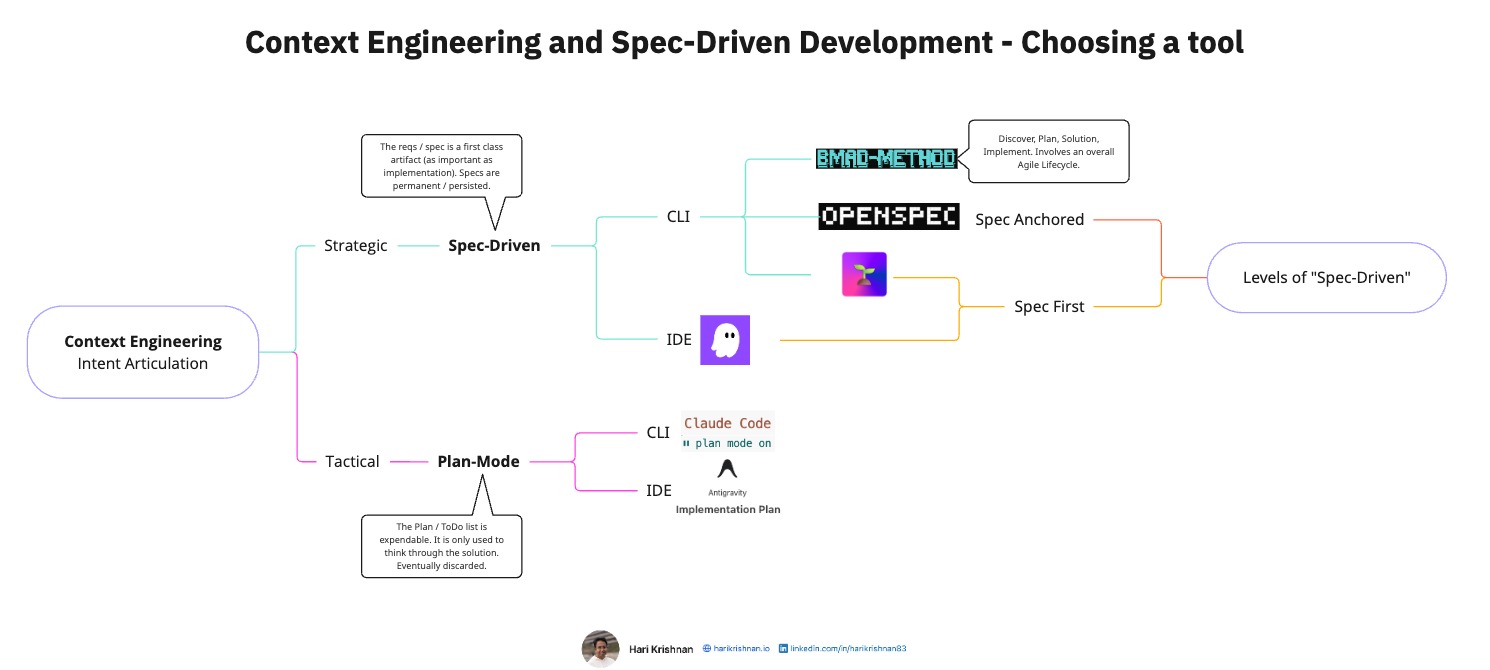
Click here to view the diagram in full size
Before selecting a tool for Spec-Driven Development (SDD) it is good to get a bearing on our workflow and the level of rigor our project demands. This post intends to provide a practical way of thinking through which tool to use.
Context Engineering Approaches
Before we jump into Spec-Driven Development, itself let us quickly look at how it differs from “Plan Mode”. This is a question I often get asked and thought I will start with that first. There are two ways to look at Context Engineering.
Tactical (Plan-Mode)
What it is: Best for rapid problem-solving. We create a plan or to-do list to think through the solution, build it, and then discard the plan. The code is the only long-term asset. Now based on our preference for CLI vs IDE based tools, there are several choices. Here are some examples that I have used.
Tools:
- Claude Code (CLI): Plan mode creates temporary implementation plans
- Antigravity (IDE): Implementation plans that guide development. Even though the plan appears in your IDE window it is not part of your repo.
Strategic (Spec-Driven)
What it is: Here the specification is a first-class citizen. It is as important as the implementation itself. Maybe even more important in comparison to the code itself (Theoretically, we can generate the code all over again if we have the spec). These specs are persistent and version controlled or stored through other means.
Again here, based on our preference for CLI vs IDE based approaches we have several choices.
Tools:
- IDE
- CLI
Other Considerations
1. Levels of “Spec-Driven”
Not all of the above tools handle the relationship between spec and code the same way.
Spec-First:
- Tools: Kiro, SpecKit
- Philosophy: The purpose of the spec is to articulate intent. Over time, the code and spec might not be aligned.
Spec-Anchored:
- Tool: OpenSpec
- Philosophy: In addition to articulating intent, the spec remains aligned at all times with the implementation.
For a deeper dive into the spec-anchored philosophy, see my LinkedIn post on Spec-Driven Development with OpenSpec: Source of Truth Specification.
2. Rigor vs. Speed
How many steps do you actually want to follow?
- Lightweight (3-4 phases): OpenSpec
- Comprehensive (Full Agile lifecycle): BMAD-Method
More rigor is not always better, it depends on how much groundwork we have already done. If we already have stories in our familiar tools like Linear, GitHub boards, Jira, etc. then maybe better to choose a tool that works with smaller features. If we want to think through a solution from an overall nebulous idea, BMAD may be necessary.
3. Legacy Code and Lock-in
Compatibility: Greenfield vs. Legacy
- Greenfield-friendly: Most tools work well with new projects where you can establish patterns from day one
- Legacy-specialized: OpenSpec claims to be specifically designed to handle the complexity of existing codebases (brownfield and 0 to 1 projects)
Exit Strategy: Portability and Lock-in Since most of us are evaluating these tools, it may be a good idea to see if the approach allows being able to switch from one tool to another without context loss when we switch spec formats.
Video Walkthrough
For a visual explanation of this decision framework and tool landscape, watch this walkthrough:
Conclusion
Better not to overthink it, start with the tool that feels most aligned with your workflow, and adjust as you learn what works for your team.
Want to dive deeper into spec-driven development practices? Explore the Knowledge Hub for detailed guides on workflows, best practices, and OpenSpec.
Read the full article on intent-driven.dev →
Originally published on intent-driven.dev on December 26, 2025