<?xml version="1.0" encoding="utf-8"?><feed xmlns="http://www.w3.org/2005/Atom" ><generator uri="https://jekyllrb.com/" version="4.3.4">Jekyll</generator><link href="https://blog.harikrishnan.io/blog/feed.xml" rel="self" type="application/atom+xml" /><link href="https://blog.harikrishnan.io/" rel="alternate" type="text/html" /><updated>2026-02-22T12:18:59+00:00</updated><id>https://blog.harikrishnan.io/blog/feed.xml</id><title type="html">Hari Krishnan’s Blog</title><subtitle>Thoughts on AI, Platform Engineering, Architecture, APIs, Developer Experience and Transformation</subtitle><author><name>Hari Krishnan</name><email>hello@harikrishnan.io</email></author><entry><title type="html">Enterprise-Scale Spec-Driven Development: New InfoQ Article</title><link href="https://blog.harikrishnan.io/2026-02-19/enterprise-spec-driven-development-infoq" rel="alternate" type="text/html" title="Enterprise-Scale Spec-Driven Development: New InfoQ Article" /><published>2026-02-19T00:00:00+00:00</published><updated>2026-02-19T00:00:00+00:00</updated><id>https://blog.harikrishnan.io/2026-02-19/enterprise-spec-driven-development-infoq</id><content type="html" xml:base="https://blog.harikrishnan.io/2026-02-19/enterprise-spec-driven-development-infoq"><![CDATA[<p>My article on InfoQ, <strong>“Spec-Driven Development – Adoption at Enterprise Scale”</strong>, was published today. It explores what it takes to move Spec-Driven Development beyond individual workflows and into organisations at scale.</p>

<p>Read the full article on InfoQ: <a href="https://www.infoq.com/articles/enterprise-spec-driven-development/">Spec-Driven Development – Adoption at Enterprise Scale</a></p>]]></content><author><name>Hari Krishnan</name></author><category term="software-architecture" /><category term="spec-driven-development" /><category term="openspec" /><category term="API" /><category term="architecture" /><category term="coding-agents" /><summary type="html"><![CDATA[My article on InfoQ explores how organisations can adopt Spec-Driven Development at scale — from brownfield integration and role-specific harnesses to cross-functional collaboration and long-term quality engineering.]]></summary></entry><entry><title type="html">OpenSpec Custom Schemas</title><link href="https://blog.harikrishnan.io/2026-02-12/openspec-custom-schemas" rel="alternate" type="text/html" title="OpenSpec Custom Schemas" /><published>2026-02-12T00:00:00+00:00</published><updated>2026-02-12T00:00:00+00:00</updated><id>https://blog.harikrishnan.io/2026-02-12/openspec-custom-schemas</id><content type="html" xml:base="https://blog.harikrishnan.io/2026-02-12/openspec-custom-schemas"><![CDATA[<p><img src="/assets/images/posts/intent-driven/openspec-custom-schemas-banner.jpg" alt="OpenSpec Custom Schemas" /></p>

<p>In the <a href="https://intent-driven.dev/blog/2026/01/26/openspec-1-0-release/">OpenSpec 1.0 release post</a>, I mentioned how <code class="language-plaintext highlighter-rouge">config.yaml</code> lets you tailor the OpenSpec workflow to your team’s needs. Custom schemas take that idea further. Instead of just configuring the workflow, you define the <strong>artifacts themselves</strong>, shaping what gets generated and in what order.</p>

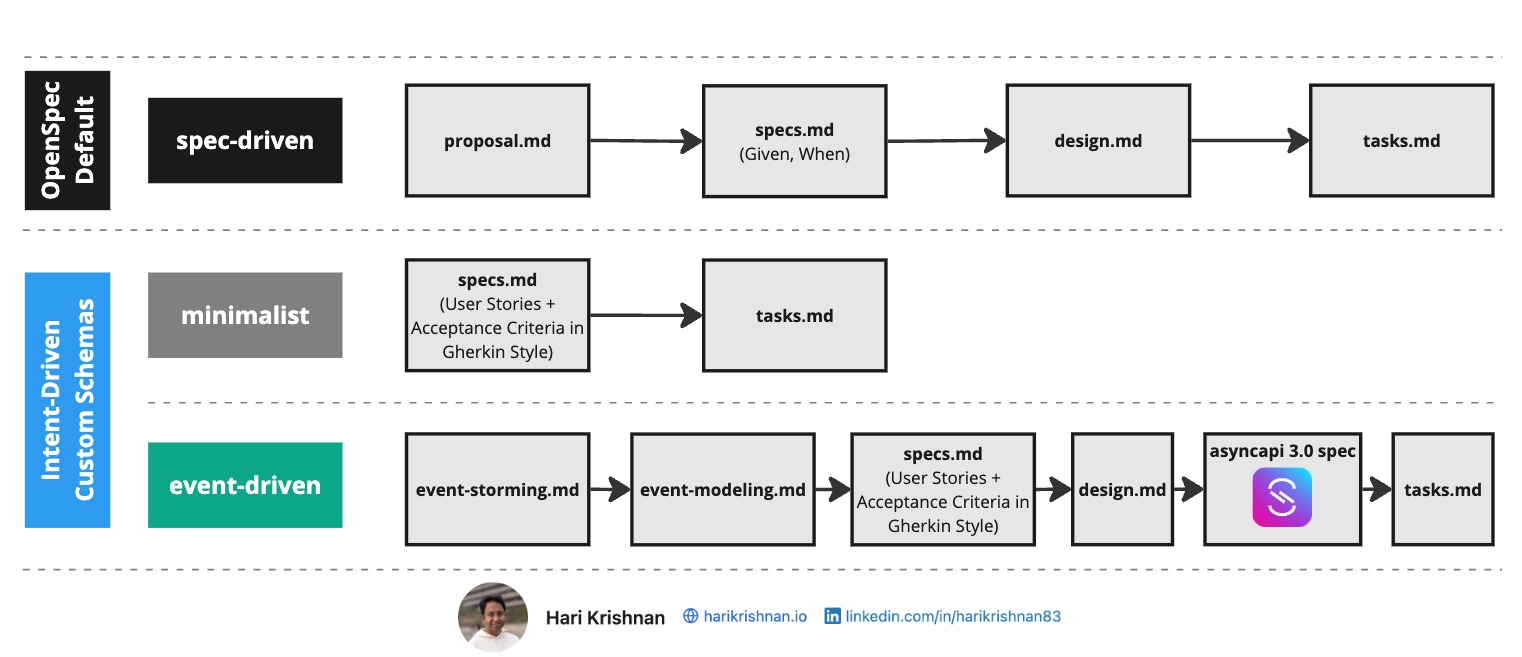
<p>OpenSpec ships with a default schema called <strong>spec-driven</strong>. It produces four artifacts in sequence: <code class="language-plaintext highlighter-rouge">proposal.md</code>, <code class="language-plaintext highlighter-rouge">specs.md</code>, <code class="language-plaintext highlighter-rouge">design.md</code>, and <code class="language-plaintext highlighter-rouge">tasks.md</code>. Each artifact feeds into the next, creating a deliberate path from idea to implementation. This works well for general-purpose projects, but not every project may fit that mold.</p>

<h2 id="custom-schemas">Custom Schemas</h2>

<p>I built a few custom schemas to explore what different workflows could look like: <strong><a href="https://github.com/intent-driven-dev/openspec-schemas">openspec-schemas on GitHub</a></strong>. Let us look at what is in this repository.</p>

<h2 id="example-1-the-minimalist-schema">Example 1: The Minimalist Schema</h2>

<p>Not every project needs four artifacts we discussed above. For well-scoped, low-risk changes, the <strong>minimalist</strong> schema strips the workflow down to two: <code class="language-plaintext highlighter-rouge">specs.md</code> and <code class="language-plaintext highlighter-rouge">tasks.md</code>.</p>

<p>Specs are authored as user stories with Given/When/Then acceptance criteria. Tasks follow directly from those specs. There is no separate proposal or design step. Details like tech stack and project constraints live in <code class="language-plaintext highlighter-rouge">config.yaml</code>, so the schema can stay lean without losing context.</p>

<p>This is a good fit when the scope is clear and the team does not need a formal proposal or design review before moving to implementation.</p>

<h2 id="example-2-event-driven-architectures">Example 2: Event-Driven Architectures</h2>

<p>For complex systems built around asynchronous messaging, the <strong>event-driven</strong> schema adds discovery and modeling steps before the usual spec-design-task flow.</p>

<p>The workflow starts with <a href="https://en.wikipedia.org/wiki/Event_storming">event storming</a>, capturing domain events, commands, actors, and bounded contexts. Next, <strong>event modeling</strong> transforms those into structured flows with Mermaid diagrams that visualize interactions and timelines. From there, the schema moves through <code class="language-plaintext highlighter-rouge">specs.md</code> and <code class="language-plaintext highlighter-rouge">design.md</code> into <a href="https://www.asyncapi.com/">AsyncAPI</a> spec generation, producing a validated <code class="language-plaintext highlighter-rouge">asyncapi.yaml</code> before any implementation tasks are created.</p>

<p>This schema is purpose-built for teams working with message brokers and event-driven patterns, ensuring that the async contract is specified and validated before code is written.</p>

<h2 id="getting-started-with-custom-schemas">Getting started with custom schemas</h2>

<p>The quickest way to get started is with the OpenSpec CLI. To create a new schema from scratch:</p>

<div class="language-plaintext highlighter-rouge"><div class="highlight"><pre class="highlight"><code>openspec schema init my-workflow --description "My custom workflow" --artifacts "specs,design,tasks"
</code></pre></div></div>

<p>This scaffolds a complete schema folder under <code class="language-plaintext highlighter-rouge">openspec/schemas/my-workflow/</code> with a <code class="language-plaintext highlighter-rouge">schema.yaml</code> and starter templates for each artifact.</p>

<p>To start from an existing schema and customize it:</p>

<div class="language-plaintext highlighter-rouge"><div class="highlight"><pre class="highlight"><code>openspec schema fork minimalist
</code></pre></div></div>

<p>This copies the schema into your project as <code class="language-plaintext highlighter-rouge">minimalist-custom</code>, ready for you to modify. You can also provide a custom name:</p>

<div class="language-plaintext highlighter-rouge"><div class="highlight"><pre class="highlight"><code>openspec schema fork minimalist my-lightweight
</code></pre></div></div>

<p>You can also grab schemas directly from the <a href="https://github.com/intent-driven-dev/openspec-schemas">openspec-schemas repository</a> by copying a schema folder into your project’s <code class="language-plaintext highlighter-rouge">openspec/schemas/</code> directory.</p>

<p>Once a schema is in place, set the <code class="language-plaintext highlighter-rouge">schema</code> field in your <code class="language-plaintext highlighter-rouge">config.yaml</code> to activate it:</p>

<div class="language-yaml highlighter-rouge"><div class="highlight"><pre class="highlight"><code><span class="na">schema</span><span class="pi">:</span> <span class="s">minimalist</span>

<span class="na">context</span><span class="pi">:</span> <span class="pi">|</span>
  <span class="s">Project: My project</span>
  <span class="s">...</span>
</code></pre></div></div>

<p>OpenSpec resolves schemas in this order:</p>

<ol>
  <li><strong>Project-level</strong> — <code class="language-plaintext highlighter-rouge">openspec/schemas/&lt;name&gt;/schema.yaml</code> in your repo</li>
  <li><strong>User-level</strong> — your global OpenSpec config folder (e.g. <code class="language-plaintext highlighter-rouge">~/.openspec/schemas/&lt;name&gt;/schema.yaml</code>) for schemas shared across projects</li>
  <li><strong>Built-in</strong> — schemas bundled with the OpenSpec package (like <code class="language-plaintext highlighter-rouge">spec-driven</code>)</li>
</ol>

<p>The first match wins. This means a project-level schema always takes precedence, so you can override a built-in schema without modifying the package.</p>

<h2 id="understanding-what-is-inside-a-schema">Understanding what is inside a schema</h2>

<p>If you want to understand how a schema works or build your own, here is what is inside. A schema is a folder containing a <code class="language-plaintext highlighter-rouge">schema.yaml</code> file and a <code class="language-plaintext highlighter-rouge">templates/</code> directory with the Markdown templates it references. Using the minimalist schema as an example:</p>

<div class="language-plaintext highlighter-rouge"><div class="highlight"><pre class="highlight"><code>openspec/
├── config.yaml
└── schemas/
    └── minimalist/
        ├── schema.yaml
        └── templates/
            ├── specs/
            │   └── spec.md
            └── tasks.md
</code></pre></div></div>

<p>The <code class="language-plaintext highlighter-rouge">templates/</code> directory contains the Markdown files referenced by the <code class="language-plaintext highlighter-rouge">template</code> field in each artifact definition.</p>

<p>The <code class="language-plaintext highlighter-rouge">schema.yaml</code> defines the artifacts, their output paths, templates, and dependencies:</p>

<div class="language-yaml highlighter-rouge"><div class="highlight"><pre class="highlight"><code><span class="na">name</span><span class="pi">:</span> <span class="s">minimalist</span>
<span class="na">version</span><span class="pi">:</span> <span class="m">1</span>
<span class="na">description</span><span class="pi">:</span> <span class="s">Lightweight schema for well-scoped, low-risk changes</span>
<span class="na">artifacts</span><span class="pi">:</span>
  <span class="pi">-</span> <span class="na">id</span><span class="pi">:</span> <span class="s">specs</span>
    <span class="na">generates</span><span class="pi">:</span> <span class="s">specs/**/*.md</span>
    <span class="na">description</span><span class="pi">:</span> <span class="s">Specifications authored as user stories with Given/When/Then acceptance criteria</span>
    <span class="na">template</span><span class="pi">:</span> <span class="s">specs/spec.md</span>
    <span class="na">requires</span><span class="pi">:</span> <span class="pi">[]</span>
  <span class="pi">-</span> <span class="na">id</span><span class="pi">:</span> <span class="s">tasks</span>
    <span class="na">generates</span><span class="pi">:</span> <span class="s">tasks.md</span>
    <span class="na">description</span><span class="pi">:</span> <span class="s">Implementation checklist with trackable tasks</span>
    <span class="na">template</span><span class="pi">:</span> <span class="s">tasks.md</span>
    <span class="na">requires</span><span class="pi">:</span>
      <span class="pi">-</span> <span class="s">specs</span>
<span class="na">apply</span><span class="pi">:</span>
  <span class="na">requires</span><span class="pi">:</span>
    <span class="pi">-</span> <span class="s">tasks</span>
  <span class="na">tracks</span><span class="pi">:</span> <span class="s">tasks.md</span>
</code></pre></div></div>

<p>Each artifact declares what it <code class="language-plaintext highlighter-rouge">generates</code>, which <code class="language-plaintext highlighter-rouge">template</code> to use, and what it <code class="language-plaintext highlighter-rouge">requires</code> before it can be created. The <code class="language-plaintext highlighter-rouge">apply</code> block tells OpenSpec which artifact gates implementation and which file tracks progress.</p>

<h2 id="video-walkthrough">Video Walkthrough</h2>

<iframe width="560" height="315" src="https://www.youtube.com/embed/k01nbZfwB34" title="OpenSpec Custom Schemas" frameborder="0" allow="accelerometer; autoplay; clipboard-write; encrypted-media; gyroscope; picture-in-picture; web-share" allowfullscreen=""></iframe>

<p>Custom schemas let OpenSpec fit your process rather than the other way around. Pick one from the <a href="https://github.com/intent-driven-dev/openspec-schemas">schemas repository</a> or use it as a starting point to build your own.</p>

<hr />

<p><strong><a href="https://intent-driven.dev/blog/2026/02/12/openspec-custom-schemas/">Read the full article on intent-driven.dev →</a></strong></p>

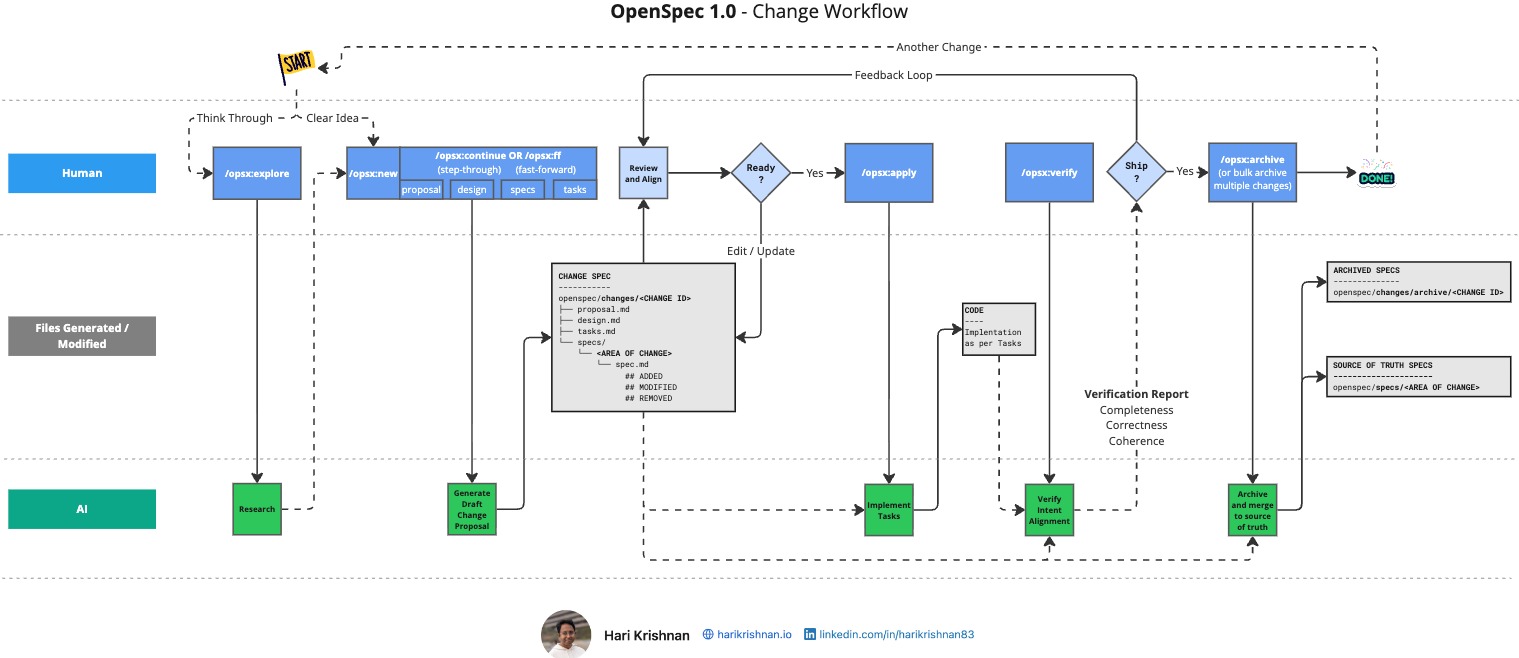
<p><em>Originally published on intent-driven.dev on February 12, 2026</em></p>]]></content><author><name>Hari Krishnan</name></author><category term="openspec" /><category term="spec driven development" /><category term="custom schemas" /><category term="workflow" /><summary type="html"><![CDATA[Customising OpenSpec workflow with schemas and config.yaml to tailor spec-driven workflows to your domain, defining exactly what artifacts your team needs and how they connect.]]></summary></entry><entry><title type="html">OpenSpec 1.0 Release</title><link href="https://blog.harikrishnan.io/2026-01-26/openspec-1-0-release" rel="alternate" type="text/html" title="OpenSpec 1.0 Release" /><published>2026-01-26T00:00:00+00:00</published><updated>2026-01-26T00:00:00+00:00</updated><id>https://blog.harikrishnan.io/2026-01-26/openspec-1-0-release</id><content type="html" xml:base="https://blog.harikrishnan.io/2026-01-26/openspec-1-0-release"><![CDATA[<p><img src="/assets/images/posts/intent-driven/openspec-1-0-release-workflow.jpg" alt="OpenSpec 1.0 Release Workflow" /></p>

<p><a href="https://intent-driven.dev/assets/blog/openspec-1-0-release/openspec-1-0-release-workflow.jpg">View the full-size workflow diagram →</a></p>

<p>OpenSpec 1.0 is <a href="https://github.com/Fission-AI/OpenSpec/releases/tag/v1.0.0">officially released</a>.</p>

<p>In an earlier post, I wrote about how the <a href="https://intent-driven.dev/blog/2025/11/09/spec-driven-development-openspec-source-truth/">OpenSpec workflow anchors development to specs as the source of truth</a>, ensuring that what gets built stays aligned with what was intended. This spec-anchored approach has been central to OpenSpec from the beginning.</p>

<p>In this post, let us look at some of the major changes that come with the 1.0 release.</p>

<h3 id="explore-before-you-build">Explore Before You Build</h3>

<p>One of the most significant additions is the <strong>Explore Mode</strong>. Before diving into implementation, you can now use OpenSpec to think through ideas which require more clarity, investigate problems, and clarify requirements.</p>

<h3 id="step-by-step-generation">Step-by-Step Generation</h3>

<p>OpenSpec 1.0 introduces a more deliberate artifact creation process. Instead of generating everything at once, you can now step through each artifact such as <code class="language-plaintext highlighter-rouge">proposal.md</code>, <code class="language-plaintext highlighter-rouge">design.md</code>, etc. one at a time.</p>

<p>This step-by-step approach helps improve the review process as each artifact can be checked before the next one is generated.</p>

<h3 id="intent-verification">Intent Verification</h3>

<p>Before archiving a completed change, OpenSpec now includes a verification step. This checks that the implementation actually matches what was specified in the change artifacts. It’s a final checkpoint that catches any intent alignment issues.</p>

<h3 id="noteworthy-mentions-in-10-release">Noteworthy mentions in 1.0 release</h3>

<p>The <code class="language-plaintext highlighter-rouge">config.yaml</code> file in OpenSpec 1.0 looks really interesting.</p>

<h4 id="seamless-integrations">Seamless Integrations</h4>

<p>OpenSpec’s config system makes it straightforward to integrate with external tools. For example, you can connect OpenSpec with Linear using MCP to automatically sync issues and track progress. I had <a href="https://intent-driven.dev/blog/2026/01/11/linear-mcp-openspec-sdd-workflow/">earlier achieved this by forking and modifying OpenSpec</a>, that may not be necessary anymore.</p>

<h4 id="customizable-workflows">Customizable Workflows</h4>

<p>Beyond integrations, <code class="language-plaintext highlighter-rouge">config.yaml</code> lets you tailor the OpenSpec workflow to your team’s needs.</p>

<h3 id="video-walkthrough">Video Walkthrough</h3>

<iframe width="560" height="315" src="https://www.youtube.com/embed/JrI-P64y7H8" title="OpenSpec Release 1.0 - Workflow Changes" frameborder="0" allow="accelerometer; autoplay; clipboard-write; encrypted-media; gyroscope; picture-in-picture; web-share" allowfullscreen=""></iframe>

<hr />

<p><strong><a href="https://intent-driven.dev/blog/2026/01/26/openspec-1-0-release/">Read the full article on intent-driven.dev →</a></strong></p>

<p><em>Originally published on intent-driven.dev on January 26, 2026</em></p>]]></content><author><name>Hari Krishnan</name></author><category term="openspec" /><category term="spec driven development" /><category term="release" /><category term="workflow" /><summary type="html"><![CDATA[OpenSpec 1.0 marks a major milestone for spec-driven development workflows, introducing Explore Mode, step-by-step generation, and intent verification capabilities.]]></summary></entry><entry><title type="html">Linear MCP + OpenSpec: A Spec-Driven Development Workflow</title><link href="https://blog.harikrishnan.io/2026-01-11/linear-mcp-openspec-sdd-workflow" rel="alternate" type="text/html" title="Linear MCP + OpenSpec: A Spec-Driven Development Workflow" /><published>2026-01-11T00:00:00+00:00</published><updated>2026-01-11T00:00:00+00:00</updated><id>https://blog.harikrishnan.io/2026-01-11/linear-mcp-openspec-sdd-workflow</id><content type="html" xml:base="https://blog.harikrishnan.io/2026-01-11/linear-mcp-openspec-sdd-workflow"><![CDATA[<p>Spec driven development Workflows</p>

<p><img src="/assets/images/posts/intent-driven/linear-mcp-openspec-sdd-workflow-cover.jpg" alt="Linear MCP + OpenSpec: A Spec-Driven Development Workflow" /></p>

<p>There are three high-level topics that often come up during my discussions with people trying to adopt Spec-Driven Development (SDD):</p>

<ol>
  <li>The Starting Point: Can I pick a story from my existing backlog in Jira, Azure DevOps (ADO), or GitHub Issues?</li>
  <li>Roles and Handoffs: Do all my team members, including the Product Team, now require Git access just to view the specs?</li>
  <li>All artifacts in a single monorepo: While colocation of artifacts may have its advantages, should we risk overcrowding the repository with business use cases, technical designs, tasks, and code?</li>
</ol>

<p>While many of us eventually switch to entirely new workflows, adoption is much smoother when we provide onboarding ramps. It helps to see the value of SDD before making fundamental changes to how we work. In this article, I attempt to address these questions through a demo workflow using <a href="https://openspec.dev/">OpenSpec</a> for SDD and <a href="https://linear.app/">Linear</a> for product planning.</p>

<h3 id="starting-where-the-backlog-lives">Starting Where the Backlog Lives</h3>

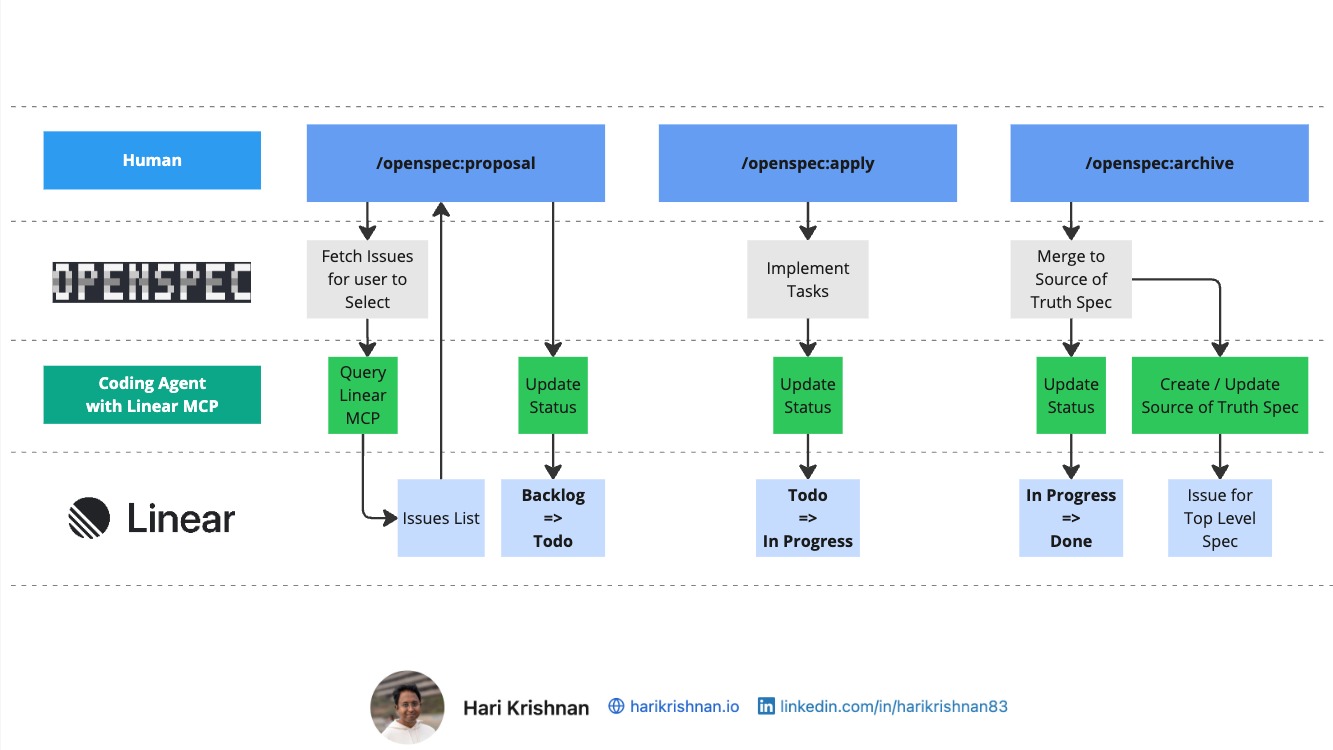
<p>One of the most frequent questions I get regarding Spec-Driven Development (SDD) is: <strong>Where is the starting point?</strong> Should you pick a story from Jira, Azure DevOps, or Linear? The answer is: <strong>Wherever your backlog lives.</strong> If that is where your requirements start, that is where your SDD workflow can begin. With most SDD tools largely focused on maintaining all artifacts in a single place, it can take a while to figure out how we integrate them into our workflows. We may also need to sync progress back to the team and keep everyone in the loop without forcing non-developers into a code repository. In this walkthrough, I use <strong>Linear</strong> and <strong>OpenSpec</strong> to explore a workflow that lets us use a project management tool or board view alongside an SDD-based workflow.</p>

<p><a href="/assets/images/posts/intent-driven/linear-mcp-openspec-sdd-workflow-diagram.jpg">Click here to view the workflow diagram →</a></p>

<hr />

<p>It is easy enough to feed a ticket to an AI agent. But what happens as the agent makes progress? In a typical siloed workflow, the developer has to manually update the ticket status. In this walkthrough, I demonstrate how <strong>OpenSpec</strong> (via MCP) can handle the paperwork for you. As the agent moves through the <em>Propose, Apply,</em> and <em>Archive</em> stages, the corresponding Linear issue automatically shifts from <strong>Backlog</strong> to <strong>In Progress</strong> and finally to <strong>Done</strong>. This ensures that the source of truth for project status is updated in real-time, without manual intervention.</p>

<h3 id="roles-and-handoffs">Roles and Handoffs</h3>

<p>A common friction point in SDD is the Git barrier. Do Product Owners or stakeholders now need to learn Git to view the latest application specifications? By keeping the product backlog in Linear in sync with the specs in the repo, we can address this point to an extent.</p>

<ul>
  <li><strong>Product Owners</strong> can stay in the tools they love (like Linear) to define the business use case and monitor progress.</li>
  <li><strong>Developers/Agents</strong> handle the technical detailing of the use cases and implementation within the repository.</li>
</ul>

<p>This workflow uses the backlog as a communication bridge, allowing for human-AI collaboration without forcing every role into the codebase.</p>

<hr />

<h3 id="separate-the-what-from-the-how">Separate the What from the How</h3>

<p>An important point to think about is the separation of concerns.</p>

<ul>
  <li><strong>The What:</strong> The business use cases and acceptance criteria (stored in Linear or other product backlogs).</li>
  <li><strong>The How:</strong> The technical design and detailed task list (stored in the Git Repo).</li>
</ul>

<p>Maintaining this separation is a necessary first step in addressing another important point, which is about the suitability of SDD for non-monorepo code organization. If we can separate the “What” from the “How”, then whether the “How” is handled in a monorepo or several repos (example: frontend, backend, etc.) can be tackled later.</p>

<p><img src="/assets/images/posts/intent-driven/linear-mcp-openspec-sdd-workflow-diagram.jpg" alt="Linear MCP + OpenSpec SDD Workflow Diagram" /></p>

<p><em><a href="/assets/images/posts/intent-driven/linear-mcp-openspec-sdd-workflow-diagram.jpg">Click here to view the workflow diagram in full size</a></em></p>

<p>GitHub code: <a href="https://github.com/intent-driven-dev/OpenSpec/tree/intent-driven-dev">OpenSpec Linear MCP fork</a></p>

<h3 id="whats-next">What’s Next?</h3>

<p>To keep this article focused, I have not yet touched on:</p>

<ul>
  <li><strong>Multi-repo use cases:</strong> How to manage specs that span across code repos.</li>
  <li><strong>AI-Assisted Backlog Generation:</strong> Using AI to help write the stories in the first place.</li>
  <li><strong>And more:</strong> Parallel implementation of stories, sync issues, etc.</li>
</ul>

<p>I will be covering these in future articles.</p>

<p><strong>I would love to hear your feedback.</strong> How are you integrating SDD into your existing toolset? Are you finding success in syncing your AI progress back to your project management boards?</p>

<hr />

<p><strong><a href="https://intent-driven.dev/blog/2026/01/11/linear-mcp-openspec-sdd-workflow/">Read the full article on intent-driven.dev →</a></strong></p>

<p><em>Originally published on intent-driven.dev on January 11, 2026</em></p>]]></content><author><name>Hari Krishnan</name></author><category term="openspec" /><category term="linear" /><category term="mcp" /><category term="spec-driven-development" /><category term="workflow" /><summary type="html"><![CDATA[This article explores how to integrate Spec-Driven Development (SDD) into existing workflows by combining Linear project management with OpenSpec. The piece addresses adoption challenges including where to start, handling team roles without forcing Git access, and separating business requirements from technical implementation details.]]></summary></entry><entry><title type="html">Which Spec-Driven Development Tool Should You Choose?</title><link href="https://blog.harikrishnan.io/2025-12-26/choosing-spec-driven-development-tool" rel="alternate" type="text/html" title="Which Spec-Driven Development Tool Should You Choose?" /><published>2025-12-26T00:00:00+00:00</published><updated>2025-12-26T00:00:00+00:00</updated><id>https://blog.harikrishnan.io/2025-12-26/choosing-spec-driven-development-tool</id><content type="html" xml:base="https://blog.harikrishnan.io/2025-12-26/choosing-spec-driven-development-tool"><![CDATA[<p><img src="/assets/images/posts/intent-driven/choosing-spec-driven-development-tool-cover.jpg" alt="Article cover: Which Spec-Driven Development Tool Should You Choose?" /></p>

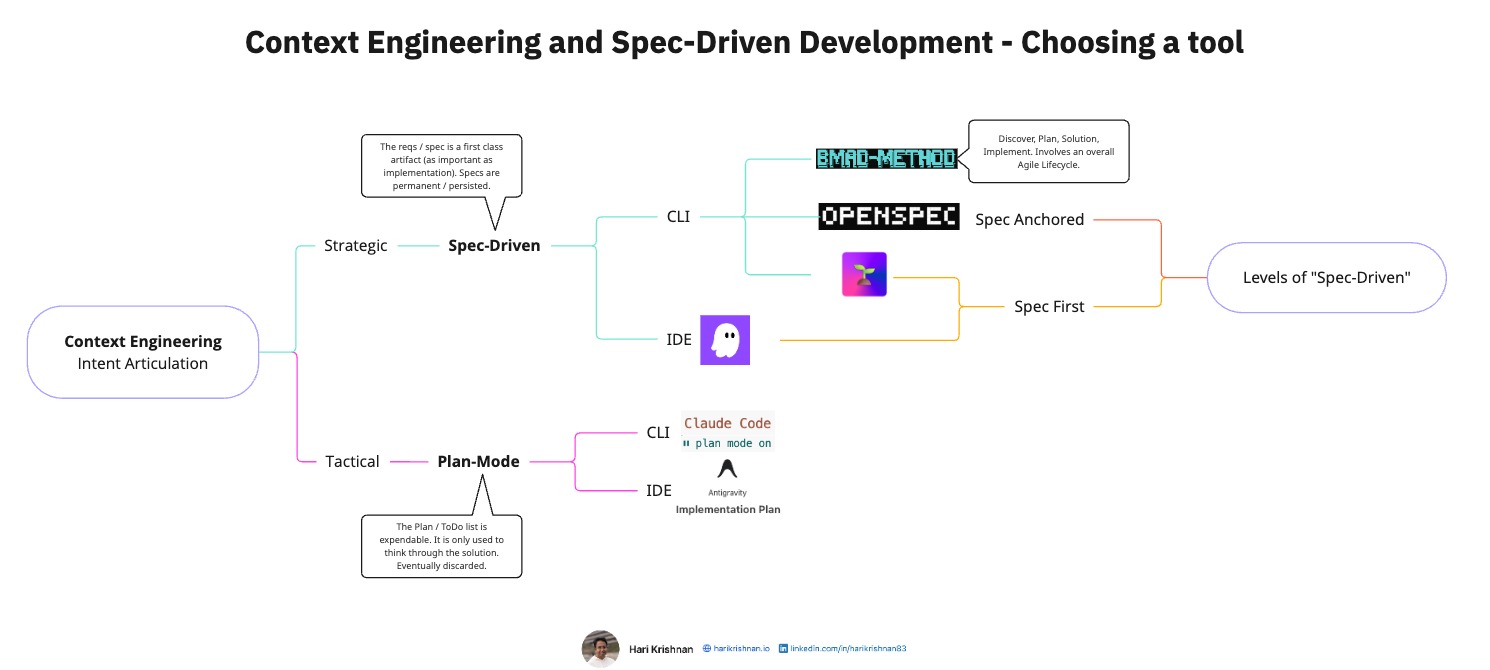
<p><em><a href="/assets/images/posts/intent-driven/choosing-spec-driven-development-tool-cover.jpg">Click here to view the diagram in full size</a></em></p>

<p>Before selecting a tool for Spec-Driven Development (SDD) it is good to get a bearing on our workflow and the level of rigor our project demands. This post intends to provide a practical way of thinking through which tool to use.</p>

<h2 id="context-engineering-approaches">Context Engineering Approaches</h2>

<p>Before we jump into Spec-Driven Development, itself let us quickly look at how it differs from “Plan Mode”. This is a question I often get asked and thought I will start with that first. There are two ways to look at Context Engineering.</p>

<h3 id="tactical-plan-mode">Tactical (Plan-Mode)</h3>

<p><strong>What it is:</strong> Best for rapid problem-solving. We create a plan or to-do list to think through the solution, build it, and then discard the plan. The code is the only long-term asset. Now based on our preference for CLI vs IDE based tools, there are several choices. Here are some examples that I have used.</p>

<p><strong>Tools:</strong></p>
<ul>
  <li><strong><a href="https://claude.com/product/claude-code">Claude Code</a> (CLI)</strong>: Plan mode creates temporary implementation plans</li>
  <li><strong><a href="https://antigravity.google/">Antigravity</a> (IDE)</strong>: Implementation plans that guide development. Even though the plan appears in your IDE window it is not part of your repo.</li>
</ul>

<h3 id="strategic-spec-driven">Strategic (Spec-Driven)</h3>

<p><strong>What it is:</strong> Here the specification is a first-class citizen. It is as important as the implementation itself. Maybe even more important in comparison to the code itself (Theoretically, we can generate the code all over again if we have the spec). These specs are persistent and version controlled or stored through other means.</p>

<p>Again here, based on our preference for CLI vs IDE based approaches we have several choices.</p>

<p><strong>Tools:</strong></p>
<ul>
  <li><strong>IDE</strong>
    <ul>
      <li><a href="https://kiro.dev/">Kiro</a></li>
    </ul>
  </li>
  <li><strong>CLI</strong>
    <ul>
      <li><a href="https://openspec.dev/">OpenSpec</a></li>
      <li><a href="https://github.com/github/spec-kit">SpecKit</a></li>
      <li><a href="https://github.com/bmad-code-org/BMAD-METHOD">BMAD-Method</a></li>
    </ul>
  </li>
</ul>

<h2 id="other-considerations">Other Considerations</h2>

<h3 id="1-levels-of-spec-driven">1. Levels of “Spec-Driven”</h3>

<p>Not all of the above tools handle the relationship between spec and code the same way.</p>

<p><strong>Spec-First:</strong></p>
<ul>
  <li><strong>Tools</strong>: <a href="https://kiro.dev/">Kiro</a>, <a href="https://github.com/github/spec-kit">SpecKit</a></li>
  <li><strong>Philosophy</strong>: The purpose of the spec is to articulate intent. Over time, the code and spec might not be aligned.</li>
</ul>

<p><strong>Spec-Anchored:</strong></p>
<ul>
  <li><strong>Tool</strong>: <a href="https://openspec.dev/">OpenSpec</a></li>
  <li><strong>Philosophy</strong>: In addition to articulating intent, the spec remains aligned at all times with the implementation.</li>
</ul>

<p>For a deeper dive into the spec-anchored philosophy, see my LinkedIn post on <a href="https://www.linkedin.com/pulse/spec-driven-development-openspec-source-truth-hari-krishnan--obrfc/">Spec-Driven Development with OpenSpec: Source of Truth Specification</a>.</p>

<h3 id="2-rigor-vs-speed">2. Rigor vs. Speed</h3>

<p>How many steps do you actually want to follow?</p>

<ul>
  <li><strong>Lightweight (3-4 phases)</strong>: <a href="https://openspec.dev/">OpenSpec</a></li>
  <li><strong>Comprehensive (Full Agile lifecycle)</strong>: <a href="https://github.com/bmad-code-org/BMAD-METHOD">BMAD-Method</a></li>
</ul>

<p>More rigor is not always better, it depends on how much groundwork we have already done. If we already have stories in our familiar tools like Linear, GitHub boards, Jira, etc. then maybe better to choose a tool that works with smaller features. If we want to think through a solution from an overall nebulous idea, BMAD may be necessary.</p>

<h3 id="3-legacy-code-and-lock-in">3. Legacy Code and Lock-in</h3>

<p><strong>Compatibility: Greenfield vs. Legacy</strong></p>
<ul>
  <li><strong>Greenfield-friendly</strong>: Most tools work well with new projects where you can establish patterns from day one</li>
  <li><strong>Legacy-specialized</strong>: <a href="https://openspec.dev/">OpenSpec</a> claims to be specifically designed to handle the complexity of existing codebases (brownfield and 0 to 1 projects)</li>
</ul>

<p><strong>Exit Strategy: Portability and Lock-in</strong>
Since most of us are evaluating these tools, it may be a good idea to see if the approach allows being able to switch from one tool to another without context loss when we switch spec formats.</p>

<h2 id="video-walkthrough">Video Walkthrough</h2>

<p>For a visual explanation of this decision framework and tool landscape, watch this walkthrough:</p>

<iframe width="560" height="315" src="https://www.youtube.com/embed/I0x01WZq1Zw" title="Spec-Driven Development - Which tool should I use?" frameborder="0" allow="accelerometer; autoplay; clipboard-write; encrypted-media; gyroscope; picture-in-picture" allowfullscreen=""></iframe>

<h2 id="conclusion">Conclusion</h2>

<p>Better not to overthink it, start with the tool that feels most aligned with your workflow, and adjust as you learn what works for your team.</p>

<p>Want to dive deeper into spec-driven development practices? Explore the <a href="https://intent-driven.dev/knowledge/">Knowledge Hub</a> for detailed guides on <a href="https://intent-driven.dev/knowledge/workflows/">workflows</a>, <a href="https://intent-driven.dev/knowledge/best-practices/">best practices</a>, and <a href="https://intent-driven.dev/knowledge/openspec/">OpenSpec</a>.</p>

<hr />

<p><strong><a href="https://intent-driven.dev/blog/2025/12/26/choosing-spec-driven-development-tool/">Read the full article on intent-driven.dev →</a></strong></p>

<p><em>Originally published on intent-driven.dev on December 26, 2025</em></p>]]></content><author><name>Hari Krishnan</name></author><category term="openspec" /><category term="kiro" /><category term="speckit" /><category term="bmad-method" /><category term="claude-code" /><category term="antigravity" /><category term="spec-driven-development" /><category term="tools" /><summary type="html"><![CDATA[A practical framework for evaluating and selecting appropriate spec-driven development tools by considering workflow requirements and project rigor levels.]]></summary></entry><entry><title type="html">Vibe Coding vs Spec-Driven Development: Intent to Implementation Deviation and Context Engineering</title><link href="https://blog.harikrishnan.io/2025-12-15/vibe-coding-vs-spec-driven-development" rel="alternate" type="text/html" title="Vibe Coding vs Spec-Driven Development: Intent to Implementation Deviation and Context Engineering" /><published>2025-12-15T00:00:00+00:00</published><updated>2025-12-15T00:00:00+00:00</updated><id>https://blog.harikrishnan.io/2025-12-15/vibe-coding-vs-spec-driven-development</id><content type="html" xml:base="https://blog.harikrishnan.io/2025-12-15/vibe-coding-vs-spec-driven-development"><![CDATA[<p><img src="/assets/images/posts/intent-driven/spec-driven-workflow-cover.jpg" alt="Article cover: Spec-driven development workflow" /></p>

<h2 id="article-summary">Article Summary</h2>

<p>The article contrasts two approaches to AI-assisted coding, arguing that workflow structure—not just technical limitations—determines success in maintaining alignment between original intent and final implementation.</p>

<h2 id="the-vibe-coding-lifecycle">The Vibe Coding Lifecycle</h2>

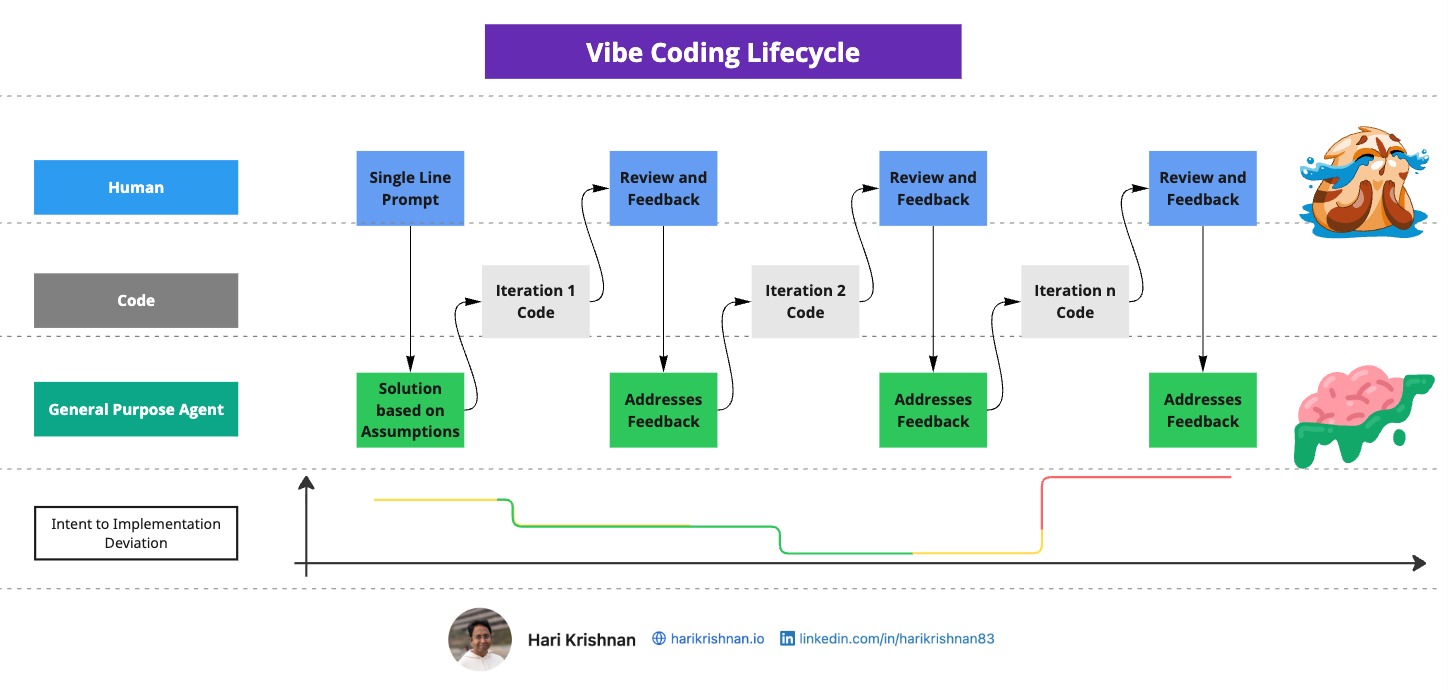
<p><img src="/assets/images/posts/intent-driven/vibe-coding-workflow.jpg" alt="Vibe coding workflow showing iterative prompt-feedback cycles" /></p>

<p><strong>How Vibe Coding Works:</strong></p>

<p>The workflow follows a linear loop: single-line prompt → general-purpose agent interpretation → code generation → human review → iteration. This approach optimizes for speed and momentum using chat-based interfaces.</p>

<p><strong>Implicit Assumptions Accumulate:</strong></p>

<p>Each prompt focuses on immediate concerns, causing agents to revise earlier decisions. “Constraints that were previously implied or loosely stated are weakened or forgotten.” Over time, corrections become fragile, creating a sustained negotiation loop where humans repeatedly restate intent.</p>

<h2 id="the-spec-driven-development-workflow">The Spec-Driven Development Workflow</h2>

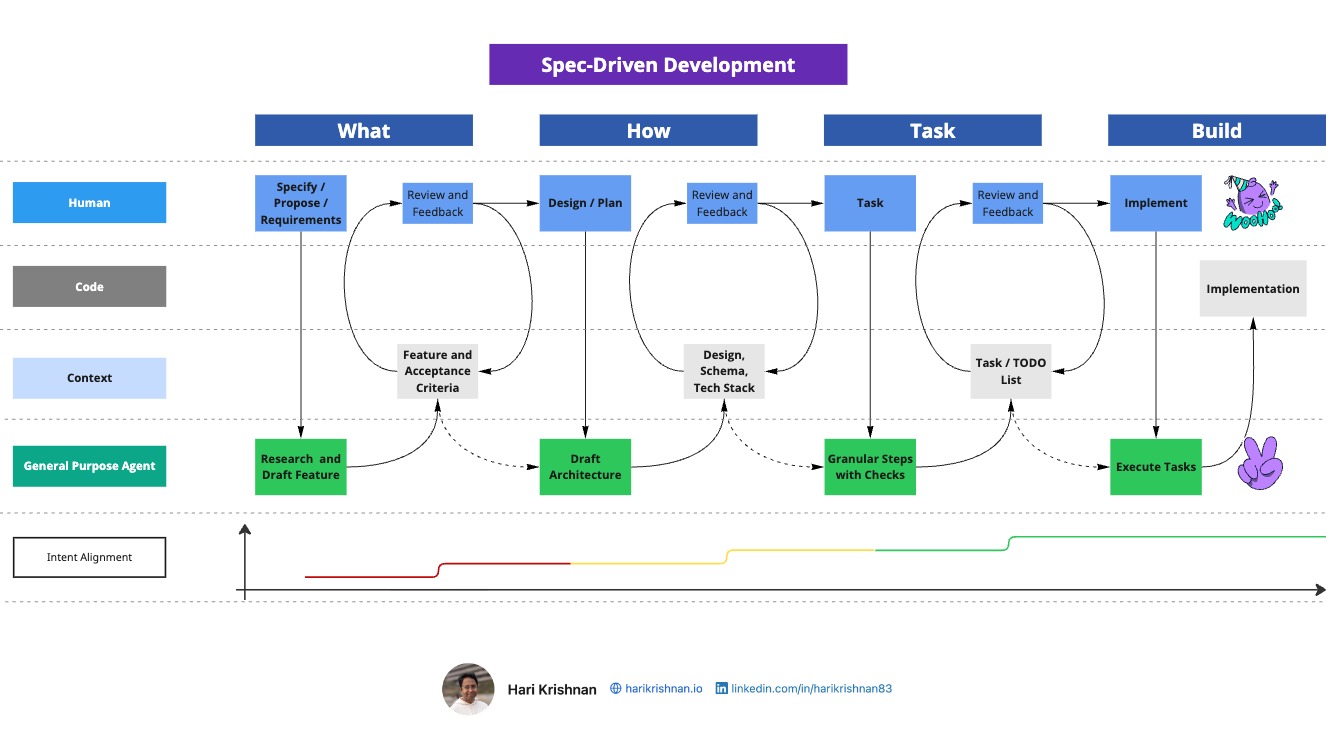
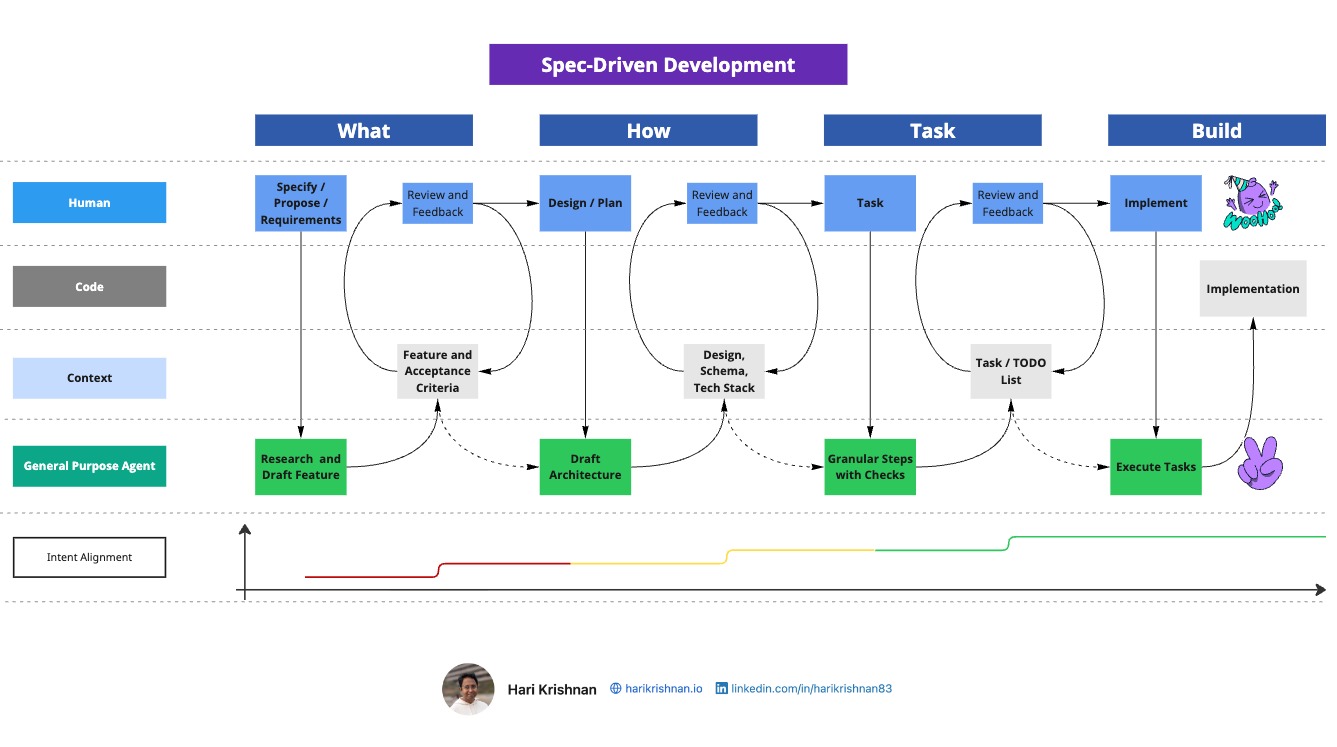
<p><img src="/assets/images/posts/intent-driven/spec-driven-workflow.jpg" alt="Spec-driven development four-phase workflow with review gates" /></p>

<p>Spec-driven development emphasizes establishing clear intent before implementation through four phases with review gates:</p>

<p><strong>Phase 1: What (Specify/Propose/Requirements)</strong></p>
<ul>
  <li>Feature requirements and acceptance criteria</li>
  <li>User needs and business goals</li>
  <li>Scope, boundaries, and non-goals</li>
  <li>Success metrics</li>
</ul>

<p><strong>Phase 2: How (Design/Plan)</strong></p>
<ul>
  <li>Architecture and technical approach</li>
  <li>Technology and pattern choices</li>
  <li>Data models, APIs, and interfaces</li>
  <li>Risks and dependencies</li>
</ul>

<p><strong>Phase 3: Task (Granular Steps with Checks)</strong></p>
<ul>
  <li>Small, verifiable work items</li>
  <li>Clear validation criteria per task</li>
  <li>Explicit dependencies and ordering</li>
  <li>Testing and verification strategy</li>
</ul>

<p><strong>Phase 4: Build (Implementation)</strong></p>
<ul>
  <li>Tasks executed sequentially or in parallel</li>
  <li>Validation against acceptance criteria</li>
  <li>Automated tests run</li>
  <li>Implementation reviewed against specs</li>
</ul>

<h2 id="conversation-matters">Conversation Matters</h2>

<p>The article explains that spec-driven development facilitates “structured conversation between humans and coding agents.” Specs function as scaffolding to “clarify and stabilize intent” rather than serving as documentation ends in themselves. This aligns with Agile values emphasizing collaboration.</p>

<h2 id="key-insight">Key Insight</h2>

<p><strong>Vibe coding</strong> prioritizes speed with minimal planning, suitable for prototypes and scripts.</p>

<p><strong>Spec-driven development</strong> prioritizes intent alignment through structure and validation, better suited for production systems and team environments.</p>

<p>The critical differentiator is intent management: “Vibe coding accepts deviation as a cost of speed. Spec-driven development reduces deviation by introducing structure, review gates, and explicit intent articulation.”</p>

<hr />

<p><strong><a href="https://intent-driven.dev/blog/2025/12/15/vibe-coding-vs-spec-driven-development/">Read the full article on intent-driven.dev →</a></strong></p>

<p><em>Originally published on intent-driven.dev on December 15, 2025</em></p>]]></content><author><name>Hari Krishnan</name></author><category term="vibe-coding" /><category term="spec-driven-development" /><category term="ai-coding" /><category term="context-engineering" /><category term="intent-alignment" /><category term="ai-agents" /><category term="development-practices" /><summary type="html"><![CDATA[Contrasting vibe coding and spec-driven development approaches to AI-assisted coding, examining how workflow structure affects alignment between intent and implementation.]]></summary></entry><entry><title type="html">Spec-Driven Development with OpenSpec - Source of Truth Specifications</title><link href="https://blog.harikrishnan.io/2025-11-09/spec-driven-development-openspec-source-truth" rel="alternate" type="text/html" title="Spec-Driven Development with OpenSpec - Source of Truth Specifications" /><published>2025-11-09T00:00:00+00:00</published><updated>2025-11-09T00:00:00+00:00</updated><id>https://blog.harikrishnan.io/2025-11-09/spec-driven-development-openspec-source-truth</id><content type="html" xml:base="https://blog.harikrishnan.io/2025-11-09/spec-driven-development-openspec-source-truth"><![CDATA[<p><img src="/assets/images/posts/linkedin/openspec-source-truth-cover.jpg" alt="Article cover: Spec-Driven Development with OpenSpec" /></p>

<p>In one of my <a href="https://blog.harikrishnan.io/2025-10-22/spec-driven-development-tools">previous articles</a> I mentioned that I have been experimenting with several Spec-Driven Development (SDD) tools, both to evaluate them and to use them in my own work. Among these, <a href="https://openspec.dev/">OpenSpec</a> has increasingly become one of my preferred SDD tools. It introduces an interesting idea of having a single top level “source of truth” spec. In this article I will look at the workflow, advantages of the “source of truth” spec and other observations about OpenSpec.</p>

<h2 id="openspec---change-workflow">OpenSpec - Change Workflow</h2>

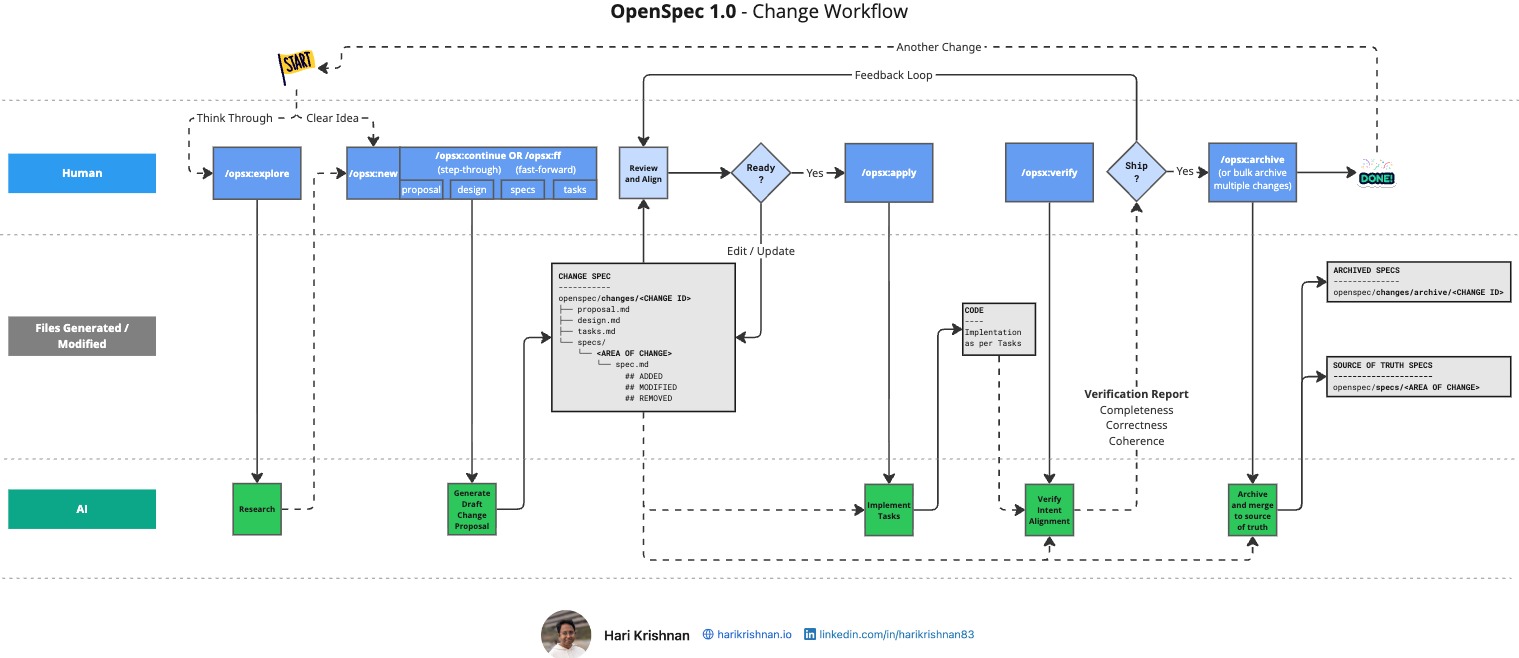
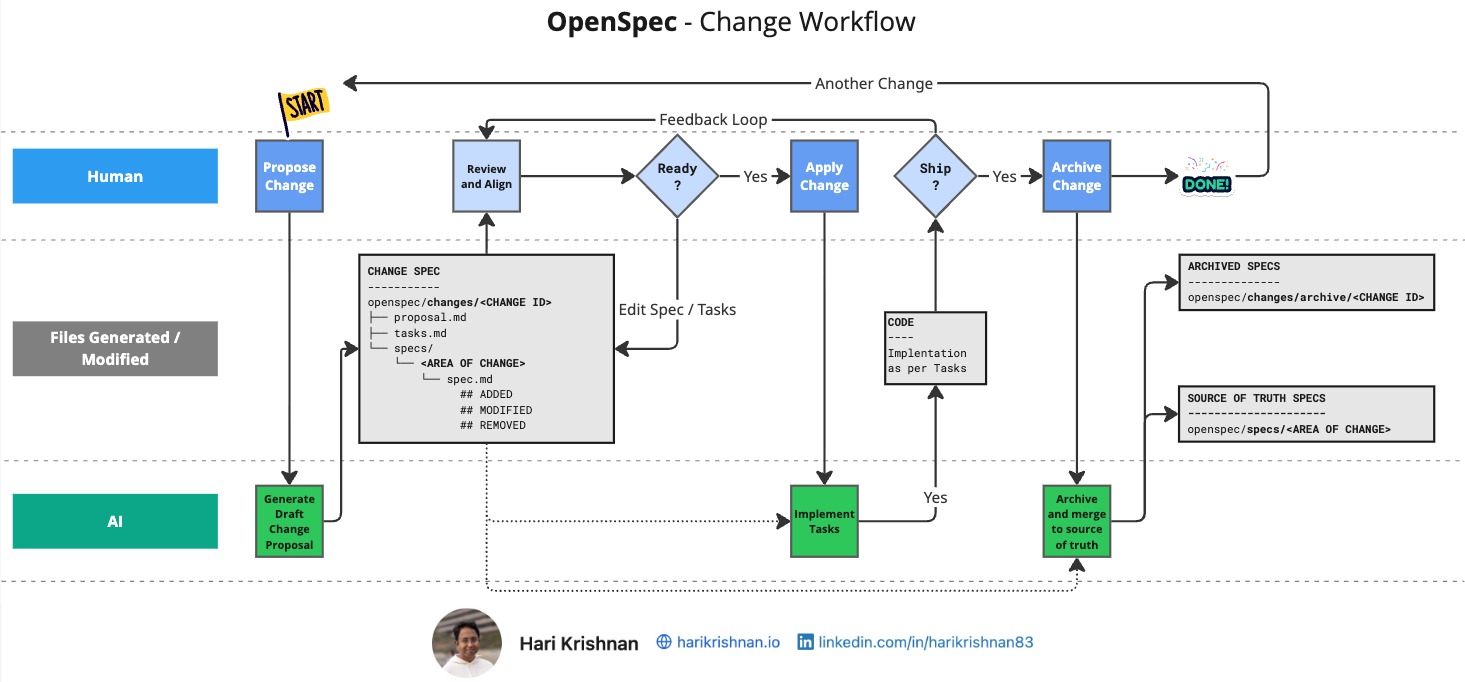
<p><img src="/assets/images/posts/linkedin/openspec-workflow-diagram.jpg" alt="OpenSpec Change Workflow" />
<em>OpenSpec Change Workflow • harikrishnan.io • CC BY 4.0 • <a href="https://creativecommons.org/licenses/by/4.0/">https://creativecommons.org/licenses/by/4.0/</a></em></p>
<p>When I started with <a href="https://github.com/github/spec-kit">GitHub Spec-Kit</a>, a <a href="https://github.com/github/spec-kit/discussions/468">feature workflow diagram by Roslyn Zolandor</a> was immensely helpful. Taking inspiration from the same, I created a workflow diagram for OpenSpec, partly to deepen my own understanding, and partly to articulate the model for others who may be exploring OpenSpec (If you spot any gaps or improvements in the above diagram, I am happy to be corrected.)</p>

<p>The diagram above focuses on the files generated during a change, in addition to the basic workflow already documented in <a href="https://github.com/Fission-AI/OpenSpec?tab=readme-ov-file#how-it-works">OpenSpec’s README</a>. Here are a few key aspects.</p>

<p>• <strong>Change Specification (Delta Spec)</strong> - These are the spec files generated when we propose a change. They follow the convention of marking sections as “ADDED,” “MODIFIED,” or “REMOVED.”</p>

<p>• <strong>“Source of Truth” Specification</strong> - This is the living spec representing the current state of the system. All delta changes eventually merge into this single document (as part of the archive step), which serves as the definitive reference.</p>

<p>• <strong>Archived Specifications</strong> - As the name suggests, these preserve the historical record of earlier delta specs once they have been merged into the “Source of Truth” spec.</p>

<h2 id="why-the-source-of-truth-spec-matters">Why the “Source of Truth” Spec Matters?</h2>

<p>To understand its importance, it helps to reflect on some of the difficulties I faced with tools like <a href="https://github.com/github/spec-kit">Spec-Kit</a> and <a href="https://kiro.dev/">Kiro</a> in this context.</p>

<p>Without a top-level spec, feature-level specs are often fragmented across subfolders within the “specs” directory. This fragmentation introduces below issues:</p>

<ol>
  <li>
    <p><strong>Fragmented Understanding</strong> - The overall intent of the system becomes scattered across multiple files, making it difficult to maintain a cohesive picture.</p>
  </li>
  <li>
    <p><strong>Evolving specs</strong> - There are several questions and confusions that seem to arise in the context of spec evolution which has been well discussed here - <a href="https://github.com/github/spec-kit/discussions/152">Evolving specs #152</a>.</p>
  </li>
  <li>
    <p><strong>Unintended Interactions</strong> - Every new feature added risks unintentionally affecting existing behaviour, since there is no unified view for validation. (I had attempted to address this to an extent with an optional “/cross-feature” command to <a href="https://www.linkedin.com/pulse/spec-driven-development-analysing-across-features-hari-krishnan--8cryc">analyse across features</a>).</p>
  </li>
</ol>

<p>In my experience, Spec-Kit works best when we keep our changes small and focused (a good idea in general), which also helps <a href="https://www.linkedin.com/pulse/spec-driven-development-mind-context-length-hari-krishnan--0cjbc">manage context length</a> as detailed in my earlier article. And with these small focused changes, I have come to treat the specs folder as a ledger where entries are added but not updated. This means even if we modify or remove capabilities, we are effectively just appending new specs.</p>

<p>If we need an overall spec for the app, we can try to construct an overall spec by sequentially applying all changes. However what we get is only a derivative view, not the primary one. It is difficult to say whether this cumulative spec remains valid or aligned with the real system over time.</p>

<p>This leads naturally to the question of what level of validation we can conceptually expect from such a setup.</p>

<h2 id="levels-of-alignment---spec-and-implementation">Levels of Alignment - Spec and Implementation</h2>

<p>I found Birgitta Boeckeler’s article, <a href="https://martinfowler.com/articles/exploring-gen-ai/sdd-3-tools.html">“Understanding Spec-Driven-Development: Kiro, spec-kit, and Tessl”</a> (recommended reading) really helpful in this context. She outlines three categories of alignment between specs and implementation.</p>

<p>• <strong>Spec-First</strong></p>

<p>• <strong>Spec-Anchored</strong></p>

<p>• <strong>Spec-As-Source</strong></p>

<p>Even conceptually, when we rely on fragmented specs (as in <a href="https://github.com/github/spec-kit">Spec-Kit</a> or <a href="https://kiro.dev/">Kiro</a>), we eventually face an alignment problem. As features are deprecated or evolve, related specs become partially invalid. Over time, this makes it impossible to validate all specs against the current system state and expect consistent results. So, this fragment spec approach essentially keeps us in the Spec-First category, where specs are useful for initial exploration and feature definition, but may not remain aligned with the implementation in the long term.</p>

<p>In contrast, by maintaining a top-level spec that continuously represents the live system, <a href="https://openspec.dev/">OpenSpec</a> is capable of being a Spec-Anchored tool, where validation remains possible at any time against the unified, source-of-truth specification.</p>

<p>I will leave out discussing “Spec-As-Source” in this article in the interest of keeping it focused.</p>

<h2 id="other-observations-about-openspec">Other observations about OpenSpec</h2>

<p><strong>Iterating Quickly</strong> - I tend to prefer small, incremental changes, and in this setup, the overall proposal cycle in <a href="https://openspec.dev/">OpenSpec</a> feels noticeably faster. With <a href="https://github.com/github/spec-kit">Spec-Kit</a>, the planning phase often takes longer (not necessarily a bad thing, since it seems to perform deeper analysis) but OpenSpec’s responsiveness helps maintain a steady rhythm of iteration.</p>

<p><strong>Flow State</strong> - Because I am able to iterate quickly, I context switch less often and I am able to remain in my zone of focus for longer.</p>

<p><strong>1-N / Brownfield Projects</strong> - <a href="https://openspec.dev/">OpenSpec</a> positions itself as more brownfield-friendly, and so far that seems to hold true. Whether through updates to the “project.md” file or by naturally evolving the source-of-truth spec, it is able to capture the current state of an existing system and support refactoring and incremental change. I have not yet tested it against a large, complex codebase to truly compare it with <a href="https://github.com/github/spec-kit">Spec-Kit</a> and <a href="https://kiro.dev/">Kiro</a>, but so far, OpenSpec’s workflow feels natural and unobtrusive when extending existing projects.</p>

<h2 id="recap">Recap</h2>

<p><a href="https://openspec.dev/">OpenSpec</a> stands out as a particularly compelling tool in the growing Spec-Driven Development ecosystem. I would recommend giving it a try.</p>

<p>That said, I am an active committer on both <a href="https://github.com/github/spec-kit">GitHub Spec-Kit</a> and <a href="https://openspec.dev/">OpenSpec</a> and continue to use <a href="https://kiro.dev/">Kiro</a> regularly. From experience, frustration often arises not from the tools themselves but from mismatched expectations.</p>

<p>I would love feedback, questions, or pointers to your own experience with OpenSpec and other SDD tools.</p>

<hr />

<p>This article was originally published at <strong><a href="https://intent-driven.dev/blog/2025/11/09/spec-driven-development-openspec-source-truth/">intent-driven.dev</a></strong></p>]]></content><author><name>Hari Krishnan</name></author><category term="spec-driven-development" /><category term="openspec" /><category term="ai-coding" /><category term="source-of-truth" /><category term="github-spec-kit" /><category term="kiro" /><category term="spec-anchored" /><summary type="html"><![CDATA[Explore how OpenSpec's approach to maintaining a single source of truth specification enables better spec-driven development workflows and continuous validation.]]></summary></entry><entry><title type="html">Spec-Driven Development - Mind the Context Length</title><link href="https://blog.harikrishnan.io/2025-10-24/spec-driven-development-mind-context-length" rel="alternate" type="text/html" title="Spec-Driven Development - Mind the Context Length" /><published>2025-10-24T00:00:00+00:00</published><updated>2025-10-24T00:00:00+00:00</updated><id>https://blog.harikrishnan.io/2025-10-24/spec-driven-development-mind-context-length</id><content type="html" xml:base="https://blog.harikrishnan.io/2025-10-24/spec-driven-development-mind-context-length"><![CDATA[<p><img src="/assets/images/posts/linkedin/mind-context-length-cover.jpg" alt="Article cover: Spec-Driven Development - Mind the Context Length" /></p>

<h2 id="spec-driven-development-and-llm-context-length">Spec-Driven Development and LLM Context Length</h2>

<p>Spec-Driven Development helps us think through features, break them down, plan implementation, and validate our work. It makes AI Coding more manageable.</p>

<p>However, there is a nuanced relationship between SDD and Context Management. SDD can either become a token-hungry markdown burden or an ally that reduces the meandering requirements journey of vibe coding.</p>

<h2 id="single-shot-prompts-to-single-spec-apps">Single-Shot-Prompts to Single-Spec-Apps</h2>

<p>The fundamental concepts backing SDD are not new. User stories and acceptance criteria help us articulate features better than rambling requirements documents. For example, Kiro uses <a href="https://alistairmavin.com/ears/">EARS</a> (Easy Approach to Requirements Syntax).</p>

<p>If we start with a specification for a very large feature or an entire application, we may struggle. Example: "automated shipment creation and vendor communication to real-time tracking and proactive issue resolution integrating with legacy components A and B.". This is akin to a single shot prompt, at a specification level.”</p>

<p>Even human engineers may not appreciate such large chunks all at once and we may often get an “I do not know if it will take a week or an eternity” estimate. The back-and-forth defining acceptance criteria can burn our project budget.</p>

<p>The coding agent has to do significant amount of work to break such a feature down into spec, plan, tasks, etc. and will have to repeatedly ask us for clarifications. For example, in GitHub Spec Kit, the spec can consume tokens quickly and show many “[NEEDS CLARIFICATION]” items that we must address. The “/plan” phase (which is generally time consuming) can quickly exhaust context window at this complexity level.</p>

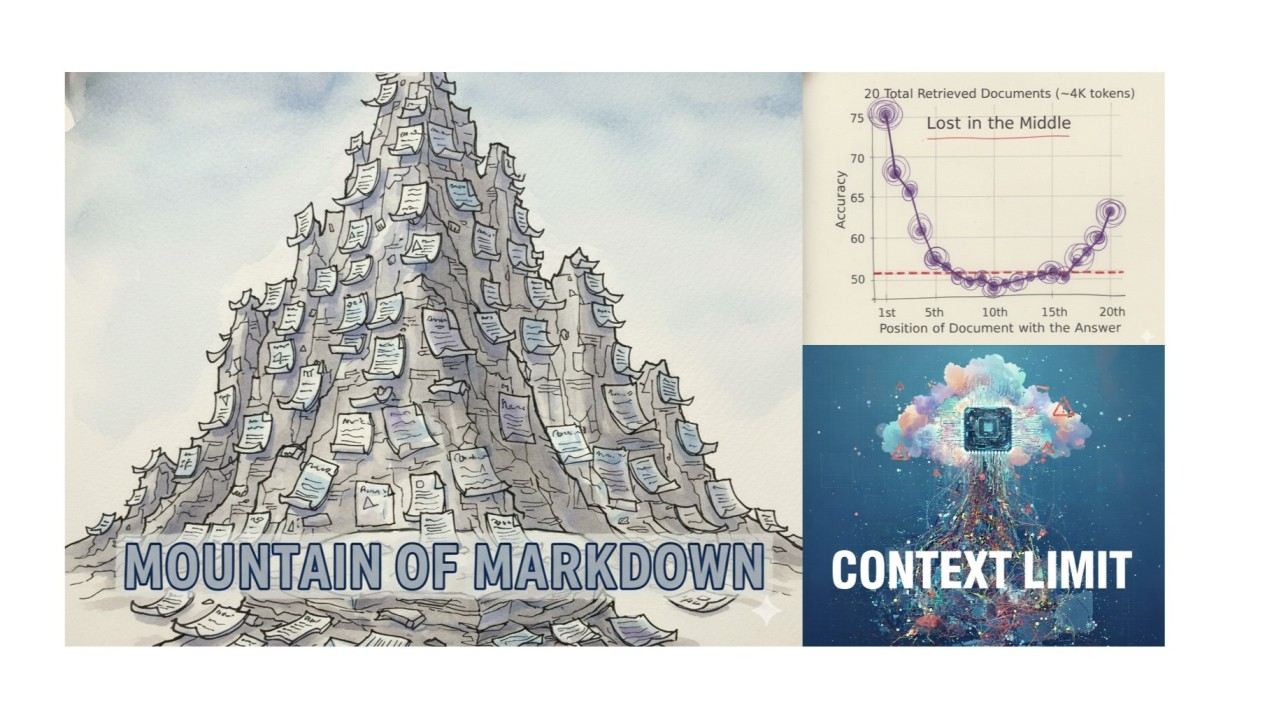
<h2 id="mountain-of-markdown">Mountain of Markdown</h2>

<p>Even with top-tier plans for our coding agents and enough patience to power through clarifications, the sheer volume of generated Markdown can become impractical for us to review.</p>

<h2 id="vibe-specifications">Vibe Specifications</h2>

<p>Using coding agents to update specs is a good practice. Sometimes it is even better than spot-fixing by hand, since the agent may catch impacts on related points. This works as long as we review the changes.</p>

<p>But if our markdown files grow too long and we start auto-updating them because reading them becomes too time-consuming, we hit an Ironic Trap.</p>

<p>At this point we are vibe specifying, which only means there will be further deviations when we begin with implementing the tasks.</p>

<p>When AI writes and updates specifications without sufficient human review, we can lose track of intent. The whole point of SDD is clarity and intentionality. If we cannot meaningfully review specs because they are too long, too numerous, or too auto-generated, they are not serving their purpose. Any issues left uncaught will show up much bigger once the implementation is done.</p>

<h2 id="lost-in-the-middle">Lost in the Middle</h2>

<p>You may know the Stanford paper <a href="https://cs.stanford.edu/~nfliu/papers/lost-in-the-middle.arxiv2023.pdf">“Lost in the Middle: How Language Models Use Long Contexts”</a> (Recommended Reading). SDD, in a way, helps engineer context to avoid the above issue and to address recency and primacy bias. However if the spec itself is too large, then even the process of specifying a feature can suffer from these issues.</p>

<p>Oversized specs risk this problem during all phases of feature development. We may notice forgotten clarifications and requirements drifting from the original direction despite validation. This loss in quality of the specification may defeat the purpose in itself.</p>

<h2 id="are-tools-to-blame">Are tools to blame?</h2>

<p>Tooling choice matters less if we are stuck in the issues above. We can debate which tool generates less markdown or switch agents between phases to optimise token usage, but this does not address the root cause. To an extent some tools can nudge us in the right direction to reduce the scope of a feature etc.</p>

<p>Tooling cannot save us from lack of structured thinking. Understanding how to decompose features always helps. SDD can accelerate the process, but whether the spec is right remains ours to review and approve.</p>

<h2 id="bite-sized-features">Bite-Sized Features</h2>

<p>“How do we know if a feature is too big? A simple heuristic: are the artefacts human reviewable? If we are skimming spec changes thinking "the AI probably got it right," the feature is too large.”</p>

<p>How do we know ahead of time? Often we don’t. Start specifying a feature, and if it is causing cognitive overload, break it down and restart. In early-stage development, restarting usually costs less than discovering a mismatch much later. We can also ask the coding agent to help us break down features at a high level.</p>

<p>Once we know a feature is too big, slicing it into meaningful pieces also requires some thought. Carving out meaningful chunks that delivery value when deployed is important as always. Once we slice a feature into stories, we can leverage concepts like <a href="https://agilealliance.org/glossary/invest/">INVEST</a> to help us check if these stories are of good quality. It may be useful to revisit books like <a href="https://www.goodreads.com/book/show/3856.User_Stories_Applied">“User Stories Applied”</a> to brush up on fundamentals. We can even feed these concepts to the coding agent to help it evaluate the size of a feature we are trying to spec.</p>

<p>Now we can prioritise these stories using techniques such as MoSCoW (Must Have, Should Have, Could Have, Would Have) to help arrive at a slice that covers the must-haves, and then reserve the rest for another day or another AI coding session.</p>

<h2 id="subagents-for-managing-context-better">Subagents for Managing Context Better</h2>

<p>Subagents can help manage context length by keeping their own isolated context. In SDD, delegating research or validation to subagents can ease the overall burden. As an added bonus, we can also parallelise these tasks where possible. But this is an optimisation. first we need to get the feature size right.</p>

<h2 id="recap">Recap</h2>

<p>SDD, like other approaches, can be done poorly and it is possible that this experience can have us dismiss it altogether. However IMHO giving it another shot with below points in mind can help achieve better outcome.</p>

<ul>
  <li><strong>Start small:</strong> Fully specify features in a line or two to start with; avoid long “and” chains.</li>
  <li><strong>Specs are for humans first:</strong> If we cannot reasonably review a spec, it is too big.</li>
  <li><strong>Slice meaningfully:</strong> Decompose features into valuable slices that can be delivered independently.</li>
  <li><strong>Context matters:</strong> Understand our coding agent limitations and design specs to avoid overly long contexts.</li>
</ul>

<p>I’d love feedback, questions, or pointers to your own experience with SDD.</p>

<h2 id="resources">Resources</h2>

<ul>
  <li><a href="https://cs.stanford.edu/~nfliu/papers/lost-in-the-middle.arxiv2023.pdf">“Lost in the Middle: How Language Models Use Long Contexts”</a></li>
  <li><a href="https://blog.harikrishnan.io/2025-10-22/spec-driven-development-tools">List of SDD tools</a> of that I am using / trialing and watching</li>
  <li><a href="https://www.goodreads.com/book/show/3856.User_Stories_Applied">“User Stories Applied”</a></li>
</ul>

<hr />

<p><strong><a href="https://www.linkedin.com/pulse/spec-driven-development-mind-context-length-hari-krishnan--0cjbc">Read the full article on LinkedIn →</a></strong></p>

<p><em>Originally published on LinkedIn on October 24, 2025</em></p>]]></content><author><name>Hari Krishnan</name></author><category term="spec-driven-development" /><category term="ai-coding" /><category term="context-length" /><category term="llm" /><category term="github" /><category term="spec-kit" /><category term="feature-decomposition" /><summary type="html"><![CDATA[Explore the nuanced relationship between Spec-Driven Development and LLM context length management, and learn practical strategies for keeping specifications human-reviewable and effective.]]></summary></entry><entry><title type="html">Spec-Driven Development: Growing list of amazing tools</title><link href="https://blog.harikrishnan.io/2025-10-22/spec-driven-development-tools" rel="alternate" type="text/html" title="Spec-Driven Development: Growing list of amazing tools" /><published>2025-10-22T00:00:00+00:00</published><updated>2025-10-22T00:00:00+00:00</updated><id>https://blog.harikrishnan.io/2025-10-22/spec-driven-development-tools</id><content type="html" xml:base="https://blog.harikrishnan.io/2025-10-22/spec-driven-development-tools"><![CDATA[<p><img src="/assets/images/posts/2025-10-22-spec-driven-development-tools/banner.png" alt="Article cover: Spec-Driven Development: Growing list of amazing tools" />
<em>Logos are property of their respective owners</em></p>

<p>Spec-driven development has been gaining momentum steadily and the growing number of tools also seems to indicate a clear demand. Here are a few tools that I am using/trialing for folks who are interested in SDD.</p>

<h2 id="using--trialing">Using / Trialing</h2>

<p><strong>Kiro</strong> (<a href="https://kiro.dev/">https://kiro.dev/</a>) - I first came across Specification-Driven Development (SDD) when I was exploring Kiro. An all-in-one AI IDE (VS Code fork) that takes you through a quick <code class="language-plaintext highlighter-rouge">Requirements</code>, <code class="language-plaintext highlighter-rouge">Design</code> and <code class="language-plaintext highlighter-rouge">Task list</code> phases.</p>

<p><strong>GitHub Spec Kit</strong> (<a href="https://github.com/github/spec-kit">https://github.com/github/spec-kit</a>) - Has been my go-to for SDD for a while now. I personally prefer CLI tools and thereby this naturally fit my workflow better. You can find out more about these in my <a href="/tags/spec-kit/">posts about speckit</a>.</p>

<p><strong>OpenSpec</strong> (<a href="https://github.com/Fission-AI/OpenSpec">https://github.com/Fission-AI/OpenSpec</a>) - I was looking for something lightweight. That is when I spotted OpenSpec and I am really beginning to like it. Overall it is definitely quicker among all the tools I have tried. I am currently evaluating its 1-N / Brownfield-first capabilities.</p>

<p><strong>ai-dev-tasks</strong> (<a href="https://github.com/snarktank/ai-dev-tasks">https://github.com/snarktank/ai-dev-tasks</a>) - “3-File System” - If you want to go even more lightweight, this is certainly something to look into. The repo only contains markdown files which you tag during each phase.</p>

<h2 id="in-my-todo-list">In my TODO list</h2>

<ul>
  <li><strong>AgentOS</strong> (<a href="https://buildermethods.com/agent-os">https://buildermethods.com/agent-os</a>)</li>
  <li><strong>Tessl</strong> (<a href="https://tessl.io/">https://tessl.io/</a>)</li>
</ul>

<h2 id="final-thoughts">Final Thoughts</h2>

<p>IMHO, all of them have their strengths and can serve as a good starting point. I have been moving across tools to understand the philosophy, how opinionated they are, and their customisability.</p>

<p>Would love to hear what others are using and how the experience has been.</p>]]></content><author><name>Hari Krishnan</name></author><category term="spec-driven-development" /><category term="ai-coding" /><category term="github" /><category term="spec-kit" /><category term="kiro" /><category term="openspec" /><category term="agentos" /><category term="tessl" /><category term="developer-tools" /><summary type="html"><![CDATA[A list of spec-driven development tools include kiro, spec-kit, openspec, tessl, agentos and more]]></summary></entry><entry><title type="html">GitHub Spec Kit Extensions: Incubate, Test, and Distribute Experimental Commands</title><link href="https://blog.harikrishnan.io/2025-10-15/spec-kit-extensions-incubate-test-distribute" rel="alternate" type="text/html" title="GitHub Spec Kit Extensions: Incubate, Test, and Distribute Experimental Commands" /><published>2025-10-15T00:00:00+00:00</published><updated>2025-10-15T00:00:00+00:00</updated><id>https://blog.harikrishnan.io/2025-10-15/spec-kit-extensions-incubate-test-distribute</id><content type="html" xml:base="https://blog.harikrishnan.io/2025-10-15/spec-kit-extensions-incubate-test-distribute"><![CDATA[<p><img src="/assets/images/posts/linkedin/spec-kit-extensions-cover.jpg" alt="Article cover: GitHub Spec Kit Extensions" /></p>

<p><em>Logos are property of their respective owners</em></p>

<p><em>This is a summary of the article originally published on LinkedIn.</em></p>

<p>After introducing the <code class="language-plaintext highlighter-rouge">/cross-feature</code> command for cross-feature analysis using Systems Thinking, a challenge emerged: how to share experimental commands, gather feedback, and iterate rapidly without waiting for PR review cycles in the main GitHub Spec Kit repository.</p>

<h2 id="key-takeaways">Key Takeaways</h2>

<ol>
  <li>
    <p><strong>Experimental repository enables rapid iteration</strong> — The spec-kit-extensions repository (https://github.com/polarizertech/spec-kit-extensions) provides an incubation space for experimental commands that may be context-specific or need community validation before upstreaming to GitHub Spec Kit.</p>
  </li>
  <li>
    <p><strong>Opt-in approach for specialized commands</strong> — Certain commands serve specific workflows or use cases. An extension repository allows teams to try experimental features without committing to them in the core Spec Kit, making innovation more accessible.</p>
  </li>
  <li>
    <p><strong>Clear naming convention prevents conflicts</strong> — Extensions use the <code class="language-plaintext highlighter-rouge">/speckit.extn</code> prefix (e.g., <code class="language-plaintext highlighter-rouge">/speckit.extn.cross-feature</code>) to differentiate from standard <code class="language-plaintext highlighter-rouge">/speckit</code> commands, making it clear which commands are experimental versus core functionality.</p>
  </li>
  <li>
    <p><strong>Low-friction installation and testing</strong> — Users can install extensions with a simple script (<code class="language-plaintext highlighter-rouge">./install.sh cross-feature &lt;PATH TO YOUR REPO&gt;</code>), enabling early experimentation without manually copying command files or modifying repository structure.</p>
  </li>
  <li>
    <p><strong>Feedback loop before upstream integration</strong> — The extension framework allows gathering community feedback on naming, flags, and developer experience before proposing changes to the main GitHub Spec Kit, resulting in better-refined features.</p>
  </li>
</ol>

<hr />

<p><strong><a href="https://www.linkedin.com/pulse/github-spec-kit-extensions-incubate-test-distribute-hari-krishnan--tqd7f">Read the full article on LinkedIn →</a></strong></p>

<p><em>Originally published on LinkedIn on October 15, 2025</em></p>]]></content><author><name>Hari Krishnan</name></author><category term="API" /><category term="spec-driven-development" /><category term="GitHub" /><category term="developer-tools" /><category term="spec-kit" /><summary type="html"><![CDATA[Explore GitHub Spec Kit Extensions—a framework for incubating, testing, and distributing experimental commands with community feedback before upstream integration.]]></summary></entry></feed>