OpenSpec Custom Schemas
In the OpenSpec 1.0 release post, I mentioned how config.yaml lets you tailor the OpenSpec workflow to your team’s needs. Custom schemas take that idea further. Instead of just configuring the workflow, you define the artifacts themselves, shaping what gets generated and in what order.
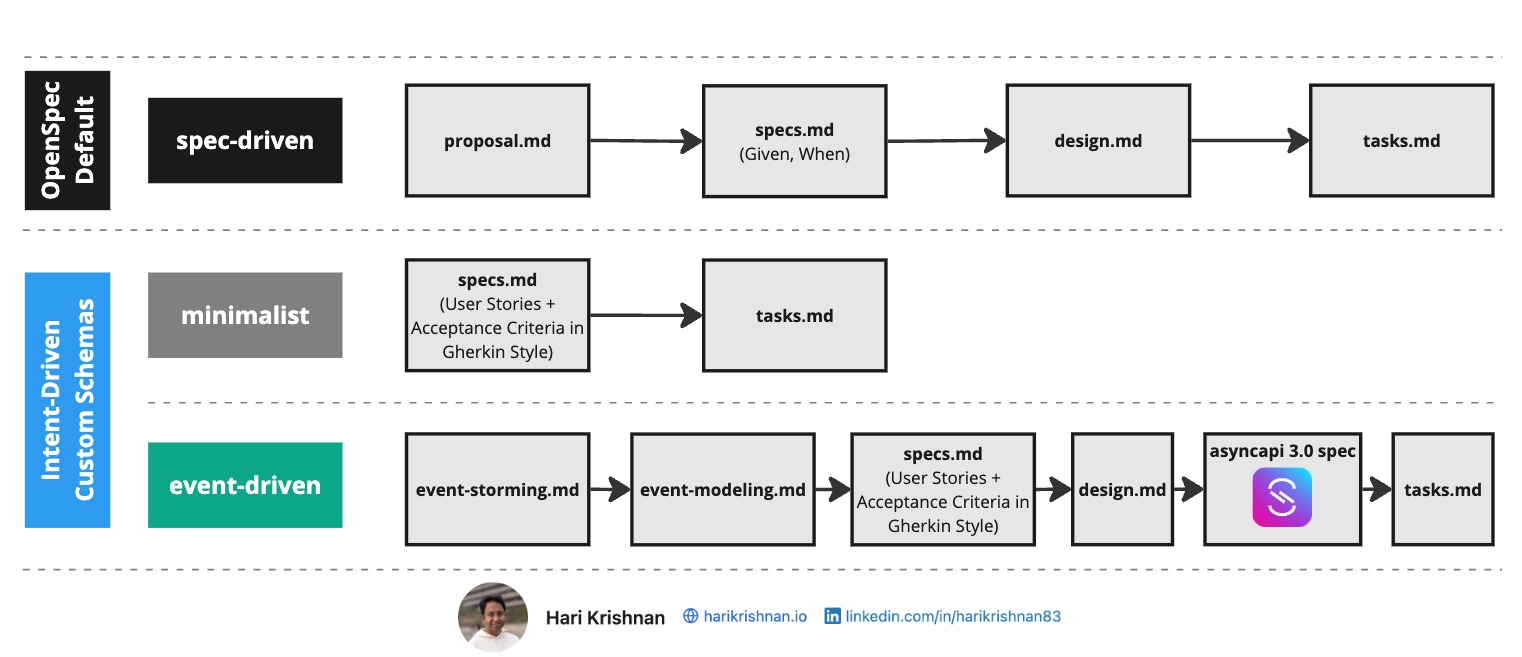
OpenSpec ships with a default schema called spec-driven. It produces four artifacts in sequence: proposal.md, specs.md, design.md, and tasks.md. Each artifact feeds into the next, creating a deliberate path from idea to implementation. This works well for general-purpose projects, but not every project may fit that mold.
Custom Schemas
I built a few custom schemas to explore what different workflows could look like: openspec-schemas on GitHub. Let us look at what is in this repository.
Example 1: The Minimalist Schema
Not every project needs four artifacts we discussed above. For well-scoped, low-risk changes, the minimalist schema strips the workflow down to two: specs.md and tasks.md.
Specs are authored as user stories with Given/When/Then acceptance criteria. Tasks follow directly from those specs. There is no separate proposal or design step. Details like tech stack and project constraints live in config.yaml, so the schema can stay lean without losing context.
This is a good fit when the scope is clear and the team does not need a formal proposal or design review before moving to implementation.
Example 2: Event-Driven Architectures
For complex systems built around asynchronous messaging, the event-driven schema adds discovery and modeling steps before the usual spec-design-task flow.
The workflow starts with event storming, capturing domain events, commands, actors, and bounded contexts. Next, event modeling transforms those into structured flows with Mermaid diagrams that visualize interactions and timelines. From there, the schema moves through specs.md and design.md into AsyncAPI spec generation, producing a validated asyncapi.yaml before any implementation tasks are created.
This schema is purpose-built for teams working with message brokers and event-driven patterns, ensuring that the async contract is specified and validated before code is written.
Getting started with custom schemas
The quickest way to get started is with the OpenSpec CLI. To create a new schema from scratch:
openspec schema init my-workflow --description "My custom workflow" --artifacts "specs,design,tasks"
This scaffolds a complete schema folder under openspec/schemas/my-workflow/ with a schema.yaml and starter templates for each artifact.
To start from an existing schema and customize it:
openspec schema fork minimalist
This copies the schema into your project as minimalist-custom, ready for you to modify. You can also provide a custom name:
openspec schema fork minimalist my-lightweight
You can also grab schemas directly from the openspec-schemas repository by copying a schema folder into your project’s openspec/schemas/ directory.
Once a schema is in place, set the schema field in your config.yaml to activate it:
schema: minimalist

context: |
  Project: My project
  ...
OpenSpec resolves schemas in this order:
- Project-level —
openspec/schemas/<name>/schema.yamlin your repo - User-level — your global OpenSpec config folder (e.g.
~/.openspec/schemas/<name>/schema.yaml) for schemas shared across projects - Built-in — schemas bundled with the OpenSpec package (like
spec-driven)
The first match wins. This means a project-level schema always takes precedence, so you can override a built-in schema without modifying the package.
Understanding what is inside a schema
If you want to understand how a schema works or build your own, here is what is inside. A schema is a folder containing a schema.yaml file and a templates/ directory with the Markdown templates it references. Using the minimalist schema as an example:
openspec/
├── config.yaml
└── schemas/
    └── minimalist/
        ├── schema.yaml
        └── templates/
            ├── specs/
            │   └── spec.md
            └── tasks.md
The templates/ directory contains the Markdown files referenced by the template field in each artifact definition.
The schema.yaml defines the artifacts, their output paths, templates, and dependencies:
name: minimalist
version: 1
description: Lightweight schema for well-scoped, low-risk changes
artifacts:
  - id: specs
    generates: specs/**/*.md
    description: Specifications authored as user stories with Given/When/Then acceptance criteria
    template: specs/spec.md
    requires: []
  - id: tasks
    generates: tasks.md
    description: Implementation checklist with trackable tasks
    template: tasks.md
    requires:
      - specs
apply:
  requires:
    - tasks
  tracks: tasks.md
Each artifact declares what it generates, which template to use, and what it requires before it can be created. The apply block tells OpenSpec which artifact gates implementation and which file tracks progress.
Video Walkthrough
Custom schemas let OpenSpec fit your process rather than the other way around. Pick one from the schemas repository or use it as a starting point to build your own.
Read the full article on intent-driven.dev →
Originally published on intent-driven.dev on February 12, 2026